


-
![]()
-
![]()
-
![]() [Self-Check-and-Repair]: How to Repair External Hard Disk Not Detected in Windows 10
[Self-Check-and-Repair]: How to Repair External Hard Disk Not Detected in Windows 10 January 29,2026
 6 min read
 -
![]() How to Repair Corrupted Word Files [Document Recovery]January 29,20266 min read
How to Repair Corrupted Word Files [Document Recovery]January 29,20266 min read -
![]()
-
![]() How to Fix Media Creation Tool Error Code 0x80072f8f - 0x20000February 15,20266 min read
How to Fix Media Creation Tool Error Code 0x80072f8f - 0x20000February 15,20266 min read -
![]()
-
![]() How to Tell if Your Computer Is 32 or 64 Bit Windows 10 [Full Ways]February 12,20266 min read
How to Tell if Your Computer Is 32 or 64 Bit Windows 10 [Full Ways]February 12,20266 min read -
![]() What Happens to the Data on an SSD When the Power Is Lost?January 29,20266 min read
What Happens to the Data on an SSD When the Power Is Lost?January 29,20266 min read -
![]() How to Recover Corrupted Macro Enabled Excel File with Top 5 WaysFebruary 12,20266 min read
How to Recover Corrupted Macro Enabled Excel File with Top 5 WaysFebruary 12,20266 min read
Page Table of Contents
PAGE CONTENT:
EasyRecovery Free Download and Full Guide
EasyRecovery, developed by Ontrack, is a well-known data recovery software that offers file recovery for deleted, formatted, or corrupted data across various devices. While its interface is a bit dated compared to newer tools, it is still widely used by professionals, especially in enterprise settings. You can download the free version of Ontrack EasyRecovery and get 1 GB of free recovery storage space.
In this article, we'll also introduce an alternative data recovery software, and this software can recover 2 GB of data for free. You can get it for free now!
We're sure every computer user, whether using Windows 11/10/8/7 or Windows XP, has lost their data at least once in their life. Do you recall how you solved your data loss issue? Did you look for data recovery software with a free cracked version, or did you purchase expensive data recovery software but find it too hard to use? Downloading the crack software can either leak your privacy or cause further data loss.
Let's check how to recover data with Ontrack EasyRecovery:
Step 1. Download and launch Ontrack EasyRecovery on your computer.
Step 2. Select what you want to recover deleted files from and choose "Next".
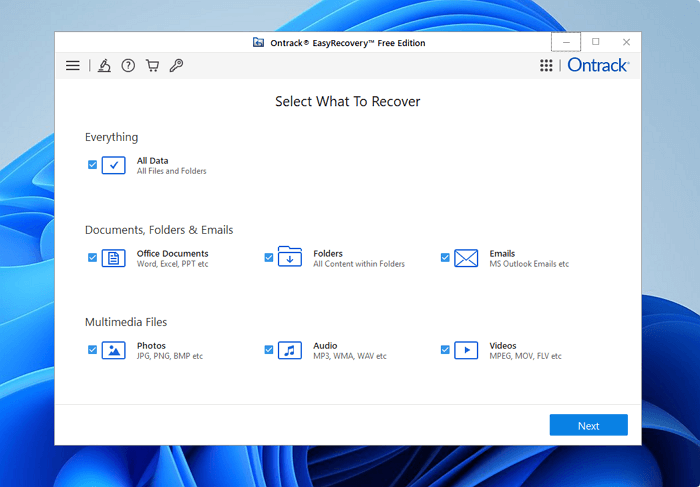
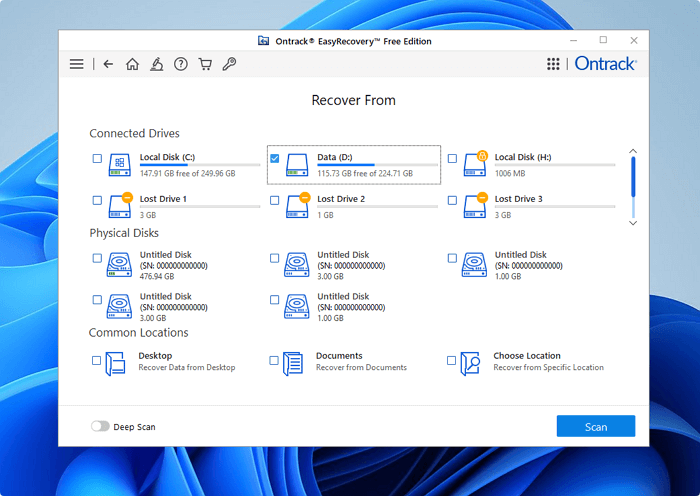
Step 3. Choose the disk you want to scan and click the Scan button to get started.
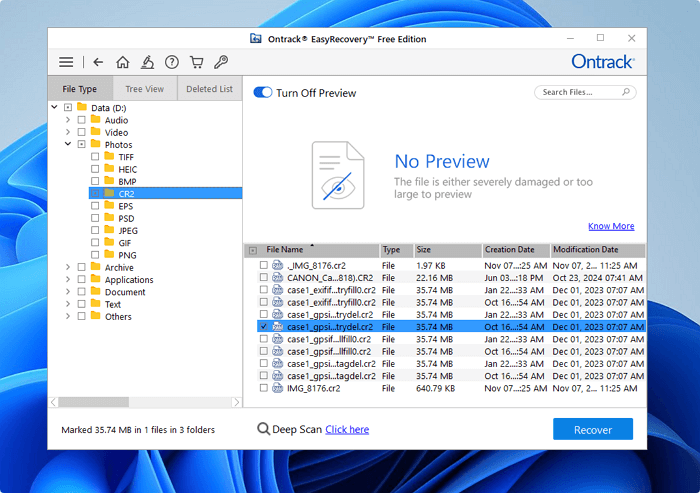
Step 4. Filter and select files, then click "Recover" to save these files. The single file should not be over 25 MB, or you need to upgrade to a paid version.
Get Free EasyRecovery Alternative - EaseUS Data Recovery Wizard
Do you have more than 1 GB of files to recover, or have you found that Ontrack EasyRecovery cannot find the wanted files? Luckily, there is another free data recovery software available that can fulfill all your needs. This software works in various data loss scenarios and provides an easy way to get the lost files back.
EaseUS Data Recovery Wizard is a powerful data recovery tool that you can recover files emptied from Recycle Bin, formatted or damaged hard drive, virus attack, partition deletion/formatting, and other difficult data loss cases where your data has got lost in Windows 11/10/8/1/8/7/XP, etc.
Key features:
- Recover files from local hard drives (HDD/SSD), external hard drives, USB flash drives, memory cards, SD cards, video players, digital cameras, etc.
- Recover nearly all file types, including photos, videos, audio files, emails, documents...
- Recover deleted files in Windows 10, Windows 11, and most Windows OSs.
- Recover data after OS crash or recover deleted files not in Recycle Bin.
EaseUS data recovery software is reliable and has helped many users who have lost important files:
| 📒Reviews |
|
Feel free to share this reliable easy recovery software on social media and help more users!

EasyRecovery Vs. EaseUS Data Recovery Wizard
While you're free to try out other recovery software to recover your data, if you are looking for convenience, you might want to consider this software.
- 100% Secure: This software is virus-free and plug-in-free.
- User-friendly: Clear and tidy interface makes the software really easy to use.
- Flexible: This software provides you with multiple choices to select the specific items you want to recover.
- Well-performed: Great speeds for scan, result retrieval, and recovery quality.
Here's a table that can help you learn the main differences between Ontrack EasyRecovery and EaseUS Data Recovery Wizard:
| Feature | EaseUS Data Recovery Wizard | Ontrack EasyRecovery |
| Free Recovery Limit | Up to 2GB | Up to 1 GB |
| Ease of Use | Beginner-friendly, no tech skills needed | Technical interface, less intuitive |
| OS Support | Windows & macOS | Mainly Windows |
| Preview Before Recovery | Supported | Supported |
| Best For | Home users & small businesses | IT professionals & corporate use |
How to Recover Data with EaseUS Easy Recovery Software
- Important
- 1. When you lose data on a storage device, stop using that device immediately. This is to reduce the chance
- of your lost data being overwritten.
- 2. Try and recover data from your storage device as soon as you can.
- 3. When you've recovered your files, save those files on a device other than the one you lost it on. This is to prevent further losses in the further.
Step 1. Select a drive and start scanning
Launch EaseUS Data Recovery Wizard and hover over the partition where you lost data. This could be an internal hard disk, external disk, USB, or SD card. Then, click "Search for Lost Data".

Step 2. Check and preview scanned files
Use the file format filter on the left or upper right corner to narrow the scan results until you find the files you need. Then, you can click the "Preview" button or double-click a file to preview its content, if you'd like.

Step 3. Recover lost data to a secure location
Click the checkbox next to the file and click "Recover" to restore the lost data to your local storage or Cloud drive. We recommend that you do not store the recovered data on the disk where you lost it earlier.

Free and Easy Data Recovery Software FAQs
To help you learn more about free and easy data recovery software, we have four questions that people frequently ask:
1. What is the best data recovery software?
We have some data recovery software to recommend here:
- 1. EaseUS Data Recovery Wizard
- 2. Recuva
- 3. R-Studia
- 4. Disk Drill
- 5. Stellar Data Recovery
- 6. Sys Tools Hard Drive Recovery
- 7. Remo Recover
- 8. Ontrack EasyRecovery
- 9. Prosoft Data Rescue
2. Can I recover lost data for free?
Yes, you can recover 2 GB data for free with EaseUS Data Recovery Wizard.
- 1. Install this software and launch it. Select the partition or storage device you want to recover data from.
- 2. Filter the files, and you can preview the files you choose before recovering them.
- 3. The files will be recovered immediately when you click the "Recover" button.
3. Is it safe to use free data recovery software?
Compared to trying to perform physical data recovery, data recovery software is a much safer method for recovering your data. However, that does not imply that data recovery software is risk-free. Even though there are many excellent data recovery solutions available, like EaseUS Data Recovery Wizard, you should absolutely be careful while using free data recovery software.
4. Can you perform data recovery yourself?
You probably won't be able to recover any data from a seriously physically damaged hard disk at home. However, if you're referring to a faulty or formatted hard disk, you may restore your data with data recovery software - EaseUS Data Recovery Wizard.
Was this page helpful?
-
Dany is an editor of EaseUS who lives and works in Chengdu, China. She focuses on writing articles about data recovery on Mac devices and PCs. She is devoted to improving her writing skills and enriching her professional knowledge. Dany also enjoys reading detective novels in her spare time. …
-
![]()
Approved by
Mahesh is an experienced computer tech writer. He's been writing tech how-to guides for about 8 years now and has covered many topics. He loves to teach people how they can get the most out of their devices.…


 Why Trust EaseUS
 Editor Reviews

20+
Years of experience

160+
Countries and regions

72 Million+
Downloads

4.9 +
Trustpilot Score





Free Data
Recovery Software
Recover data up to 2GB for free!


