




-
![]()
-
![]()
-
![]()
-
![]() How to Recover Permanently Deleted Files from OneDrive [Easy]
How to Recover Permanently Deleted Files from OneDrive [Easy] April 02,2026
 6 min read
 -
![]()
-
![]() How to Recover Deleted PST File in Outlook 2019/2016/2013/2010February 12,20266 min read
How to Recover Deleted PST File in Outlook 2019/2016/2013/2010February 12,20266 min read -
![]() Recover Deleted Minecraft Worlds Without Backup on PS4/PS5/Windows/MacFebruary 12,20266 min read
Recover Deleted Minecraft Worlds Without Backup on PS4/PS5/Windows/MacFebruary 12,20266 min read -
![]() How to Recover Deleted PNG Files with 5 Straightforward Methods [Easy]February 12,20266 min read
How to Recover Deleted PNG Files with 5 Straightforward Methods [Easy]February 12,20266 min read -
![]() How to Recover Deleted MP4 Files on Windows 10/11 [Ultimate Guide]February 12,20266 min read
How to Recover Deleted MP4 Files on Windows 10/11 [Ultimate Guide]February 12,20266 min read -
![]() [SOLVED] Will System Restore Recover Deleted Files in Windows 10April 09,20266 min read
[SOLVED] Will System Restore Recover Deleted Files in Windows 10April 09,20266 min read
Page Table of Contents
To recover deleted files from the Recycle Bin, locate the "Recycle Bin" on your desktop. Open the system folder, double-click the icon or selection. From the menu at the top of the screen, click the button labeled Restore all things or the selected items.
PAGE CONTENT:
As a seasoned data recovery expert with extensive experience in salvaging lost files, I have encountered various scenarios where users inadvertently delete important files from their Recycle Bin. In this article, I will provide you with comprehensive insights and effective methods to recover deleted files from the Recycle Bin, drawing from my professional background and industry best practices.
Is It Possible to Recover Deleted Files From the Recycle Bin?
One of the most common questions I receive is whether it's possible to recover files after they have been deleted from the Recycle Bin. The answer is yes, but the success rate depends on several factors, such as the time elapsed since the deletion, the storage device's usage, and the file system type.
When you accidentally delete files in the Windows operating system, the Recycle Bin on your PC will save all deleted files and folders for a specific period. You can go to the Recycle Bin to find the item and quickly recover deleted folders and files without losing data.
However, in several scenarios, the deleted files won't end up in the Recycle Bin, leading to permanent data loss unless specialized Recycle Bin Recovery tools are used.
- Files deleted via Shift+Delete bypass the Recycle Bin entirely, erasing them immediately.
- Deletions performed through the Command Prompt or from external drives (e.g., USB flash drives) skip the Recycle Bin by default, permanently removing data.
- Enabling the "Don't move files to the Recycle Bin" setting in Windows overrides temporary storage, deleting files outright.
- Even when the Recycle Bin is active, oversized files or a full Recycle Bin can trigger direct deletion, as the system prioritizes space over retention.
These scenarios highlight the Recycle Bin's limitations, emphasizing the need for proactive backups or file recovery software to recover deleted files from Recycle Bin after empty.
Here, various reliable methods are available to help you recover deleted files from the Recycle Bin. Follow these steps to recover the deleted Recycle Bin on your own now with Windows file recovery solutions. You can briefly understand what these solutions are and their applicable scenarios.

Recover Deleted Files from Recycle Bin in Windows 11/10
How do I get files deleted from the Recycle Bin back? We'll provide 4 possible solutions to help you recover the Recycle Bin:
- Method 1. Retrieve Files Deleted from the Recycle Bin with Data Recovery Software
- Method 2. How to Recover Permanently Deleted Files from Recycle Bin via File History
- Method 3. Restore Recycle Bin with the Previous Version
- Method 4. Try the CTRL + Z Keyboard Shortcut to Unhide Files
- Method 5. Recover Recycle Bin Deleted Files with the Command Prompt
- Method 6. Use Backup and Restore to Recover Files from the Recycle Bin
You can navigate directly to your preferred solution using the navigation above. However, before that, we'll discuss two scenarios for recovering deleted files from the Recycle Bin: recovering them directly before emptying the Recycle Bin, and recovering them after emptying the Recycle Bin using the techniques described in this tutorial.
After deleting files in Windows, you can quickly recover deleted files from the Recycle Bin folder. If you have enabled the automatically empty the Recycle Bin option, deleted file recovery should act quick or the Recycle Bin will be automatically emptied. Windows Recycle Bin will keep recently deleted files for 30 days by default. You can directly perform a recovery of the Recycle Bin and bring the removed files back from the following cases:
- Files in the Recycle Bin are not emptied.
- Files kept in the Recycle Bin are still in the recycling period (1 day, 14 days, 30 days, 60 days).
- Deleted files were recycled, not bypassing the Recycle Bin.
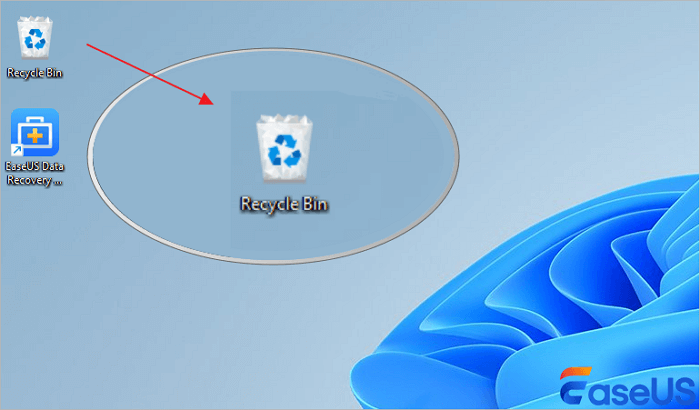
Step 1. Open the Recycle Bin by double-clicking on its icon on the Desktop.
Step 2. View deleted items and find the deleted files you need to recover. You can search for the item through the search bar in the top-right corner.
Step 3. Select the deleted file or hold down the control key to choose multiple files.
Step 4. Right-click the selected item and choose "Restore" to confirm and move it to its original location. You can also go to the "Manage" tab on the top pane and click "Restore the selected items" to restore them. It's a simple way to quickly recover deleted files in Windows 10, 11, and other OSs.

Wait patiently; the restored file will reappear in its original location with the same contents, date, and time, etc. You can view and make use of these files again.
How to Recover Deleted Files from Recycle Bin After Empty
If you have emptied the Recycle Bin after deleting files, or if data was removed in the following ways, files won't be recycled but permanently deleted, including:
- Use the "Shift + Delete" keys.
- Files/folders are too big to recycle, bypassing the recycle bin.
- The Windows Recycle Bin is too full to keep the deleted items.
User error on my part, deleted every folder from the onedrive site version and also deleted it from the bin BEFORE unlinking, their site feedback refuses to send any message I attempt to send. Is there any chance of getting those folders back now? from Microsoft Community
Method 1. Retrieve Files Deleted from the Recycle Bin with Data Recovery Software

So, how to recover deleted files from the Recycle Bin after emptying it in Windows 10 or 11? EaseUS Data Recovery Wizard can help. It will thoroughly scan the computer drive and restore deleted files that are not in the Recycle Bin.
How to perform Windows file recovery? Download and install this tool on your main hard drive to avoid data overwriting. Then, take the following 3-step guide to recover files from the Recycle Bin after emptying it with the EaseUS data recovery software tool:
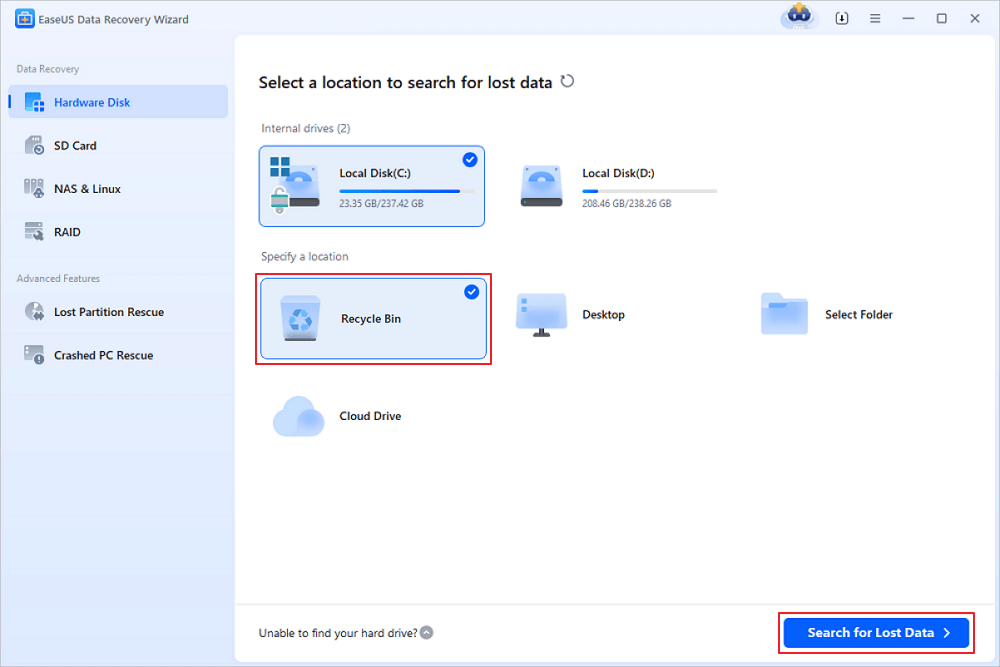
Step 1. To specifically recover files from emptied Recycle Bin on Windows 11/10/8/7, hover the mouse pointer over the "Recycle Bin" option under the "Hardware Disk" section and click "Search for Lost Data".
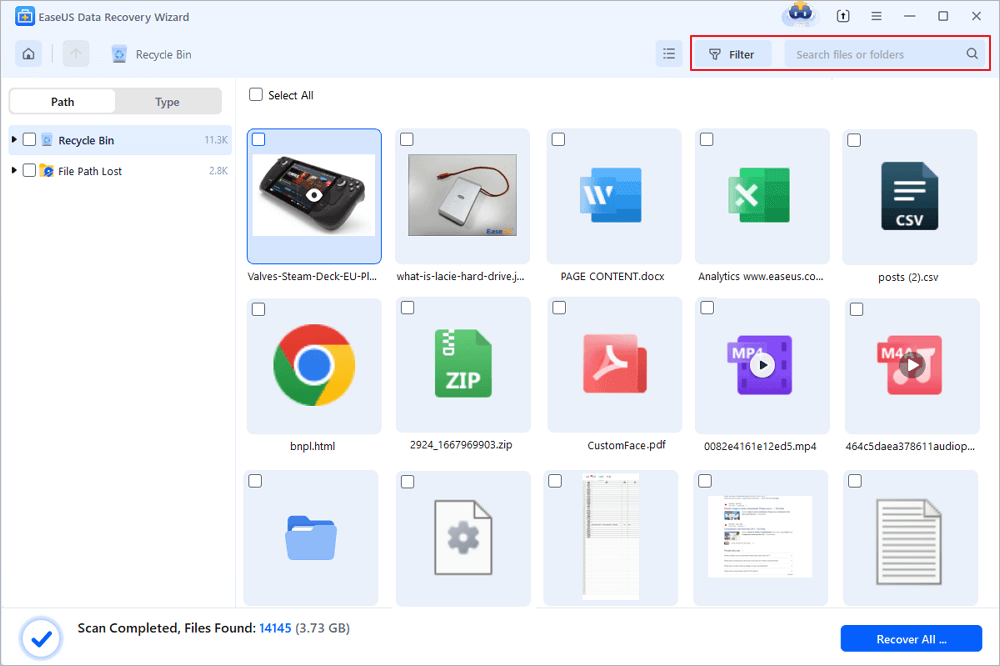
Step 2. EaseUS data recovery software will start a quick scan immediately for all deleted files, and later a deep scan will launch automatically to scan more lost files. After the scanning process, you can use the "Filter" feature to select a specific file type, such as Pictures, Word, videos, etc.
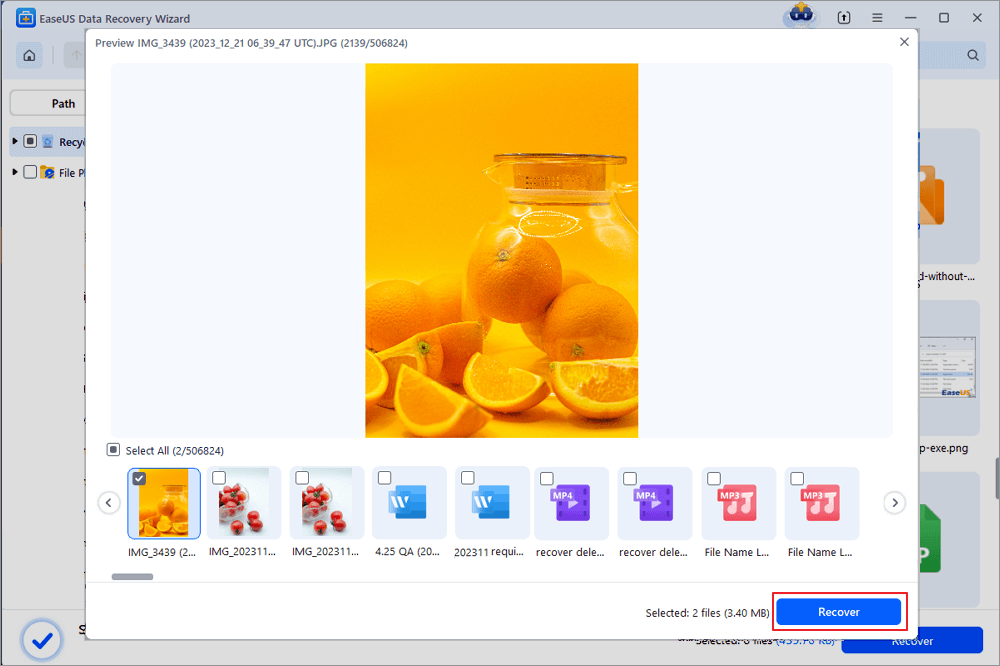
Step 3. Once you locate the files you want to restore, you can double-click it for a full preview. Then, select the target files and click "Recover". We suggest you select a different volume or an external USB drive to save the recovered files to avoid data overwriting. You can choose a cloud storage, such as OneDrive, Google Drive, etc., and click "Save" to save your recovered files.
Share this data recovery software on your social media to help more people restore deleted files from the Recycle Bin.
You can watch this video to get yourself familiarized with the steps of recovering permanently deleted files from the Recycle Bin here:
- 00:22 Recover Deleted Files from Recycle Bin (Not Emptied)
- 00:50 Recover Recycle Bin via File History After Empty
- 01:17 Restore Recycle Bin with Windows Previous Versions
- 01:46 Recycle Bin Deleted Recovery from Windows Backup
- 02:33 Emptied Recycle Bin Recovery with Data Recovery Software
Method 2. How to Recover Permanently Deleted Files from Recycle Bin via File History

Congratulations! You can back up your deleted files via Windows File History on the computer and bring them back to your PC. However, nothing will be found if you don't create a backup. This method only applies to Windows 8/10/11 users. Here are the detailed steps to perform Windows file recovery and recover permanently deleted files:
Step 1. Open the search box, enter, and click File History.

Step 2. Click "Restore personal files" on the left panel to open your backup files.

Step 3. Use the left and right arrows to choose the files you want and click the "Restore" button.

The above method can help you recover deleted files in Windows 11 and 10. For Windows 7 users, you can apply the Backup and Restore features.
Restore Files from Windows Backup in Windows 7:
Step 1. Click the Start button, and select "Control Panel".
Step 2. Then select "System and Security".

Step 3. Click "Backup and Restore", and select "Restore my files".

After this, follow the onscreen instructions to immediately return permanently deleted files that were not recycled in the Recycle Bin.
Method 3. Restore Recycle Bin with the Previous Version

There's another way to perform Recycle Bin recovery for free. When you delete or lose files and folders on your computer, but the Recycle Bin fails to restore them, you may try to find them from its previous version. Note that this method is only for a try. Let's see how to reclaim deleted items from Recycle Bin using the previous versions:
Step 1. Open Windows File Explorer on your computer.
Step 2. Navigate to the folder used to save the deleted content, right-click on it, and select "Properties".

Step 3. Click "Previous Version", choose a version before the date you deleted the file, and click "Restore" to restore the previous version.

After restoration, you can reopen the file folder and check if your lost files show up in your computer's original location. If this method doesn't work, turn to EaseUS Data Recovery Wizard for help.
If this article helped you, share it with your friends on Twitter, Facebook, or Instagram!
Method 4. Try the CTRL + Z Keyboard Shortcut

One of the simplest methods to undo deleted files is by using the CTRL + Z keyboard shortcut. This command undoes the last action, which can be effective if the file was deleted moments ago.

However, this method is limited and only works for very recent deletions.
Method 5. Recover Files with the Command Prompt
For more advanced recovery, you can utilize the Command Prompt. Here are the steps:
Step 1. Open "Command Prompt" as Administrator.
Step 2. Type chkdsk X: /f and press Enter. For example: chkdsk d: /f

Step 3. Press Y until the command line appears. Then type the drive letter and hit Enter.
Step 4. Enter this command: ATTRIB -H -R -S /S /D D:*.*
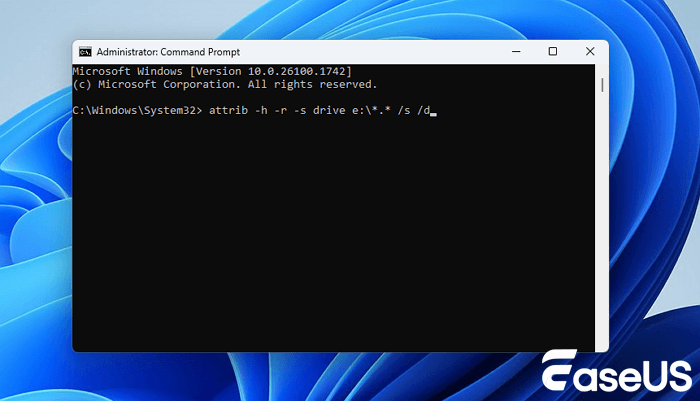
The hidden folders that might have your missing data are shown by these instructions. It will be difficult to determine whether the files you needed have been recovered, as filenames will be displayed in a generic form.
Method 6. Backup and Restore to Recover Files Deleted from the Recycle Bin
If you have enabled the Backup and Restore feature on your Windows system, you can recover deleted files as follows:
Step 1. Open "Control Panel" and navigate to "Backup and Restore (Windows 7)" or "Restore files from a backup" in newer versions.

Step 2. Select "Restore my files" and browse for the files you want to recover.
Step 3. Follow the on-screen instructions to restore the files to their original location or a new location.
Recycle Bin Recovery on Other Systems [macOS/Linux/Android]
While the focus of this article has been primarily on Windows systems, it's important to note that file recovery from similar mechanisms, such as the Recycle Bin, is possible on other operating systems as well.
- Restore Deleted Files from Trash on macOS
- Retrieve Files Deleted from the Recycle Bin Recovery in Linux
- Restore Deleted Files from Recycle Bin on iOS and Android
- Recover Deleted Files from OneDrive Recycle Bin
Restore Deleted Files from Trash on macOS

There is a Recycle Bin folder on a Mac or MacBook; the method is similar to the Windows one. You can easily recover Trash on a Mac with the following steps:
Step 1. Open the Trash folder on Mac from the Dock. Only one click will bring up the Trash folder window.
Step 2. Choose the file you want to put back and right-click.
Step 3. Click "Put Back" to restore the selected item to its original location.

However, we have received a lot of feedback from users saying Mac Trash recovery is not always simple if you emptied it or didn't turn off Empty Trash Automatically. In this regard, you need a more capable way to undo empty Trash on your Mac.
If there are no files in the Trash, it's recommended that you download the EaseUS Data Recovery Wizard for Mac to restore permanently deleted files from the Trash bin.
Retrieve Files Deleted from the Recycle Bin Recovery in Linux
Linux systems handle deleted files differently from Windows. While most desktop environments (e.g., GNOME, KDE) include a Trash folder (similar to the Recycle Bin), files deleted via terminal commands like rm bypass the Trash entirely. Below is a detailed guide to recovering files in both scenarios, along with tool recommendations and limitations.
If you deleted files via the Linux desktop's Move to Trash option, recovery is straightforward:
Step 1. In GNOME/KDE: Click the Trash icon on the desktop or taskbar.
Step 2. Navigate via terminal:
cd ~/.local/share/Trash/files # Trash location for most distros
Step 3. Right-click the file(s) in the Trash and select Restore.
Step 4. Alternatively, manually copy files back to their original location:
cp ~/.local/share/Trash/files/lost_file.txt /original/path/
Restore Deleted Files from Recycle Bin on iOS and Android

Unlike Windows or macOS, iOS does not have a system-wide Recycle Bin, but many apps include Recently Deleted folders or cloud-based recovery options. Below's how to recover deleted files in iOS:
iOS automatically moves deleted photos and videos to the Recently Deleted album for 30 days before permanent removal.
Steps:
Step 1. Open the "Photos" app.
Step 2. Go to "Albums → Utilities → Recently Deleted".
Step 3. Tap "Select", choose the items, and tap "Recover".
While using Android phones, you may accidentally delete photos and videos in the Photos app. These deleted files will be temporarily stored in the recently deleted album. Here, we'll take a Samsung mobile phone as an example to help you recover deleted files from the Android Recycle Bin.
How to Recover Deleted Photos from Samsung Recycle Bin
Samsung mobile phone has a Cloud Recycle Bin feature, and you can restore deleted items from the Cloud Recycle Bin.
How to find deleted pictures on Samsung:
Step 1. Tap the Gallery icon on the Samsung phone.
Step 2. Find and click the three-dot Settings icon in the upper right corner of the screen.
Step 3. Select the Cloud Recycle Bin and restore your deleted photos.
- 💡Tip
- The Recycle Bin can only hold all of your deleted files for a maximum of 15 days. After 15 days, your deleted files will then be permanently erased from the Samsung mobile phone.
Recover Deleted Files from OneDrive Recycle Bin
OneDrive is a cloud storage service provided by Microsoft that is compatible with Windows, macos, iOS, and Android. If you accidentally delete a file, you can restore it from OneDrive's recycle bin.
Notes: The retention periods of the deleted files in OneDrive's recycle bin are:
- Personal accounts: 30 days.
- Business/school accounts: 93 days (unless modified by admin)
Step 1. Open your browser and navigate to the OneDrive website. Sign in with your Microsoft account.
Step 2. Click the Recycle Bin, located on the left navigation pane.
Step 3. Find the deleted files or folders, then tick the boxes next to them. You can select a single file or all items based on your needs.
Step 4. Click the "Restore" button at the top to recover the deleted files from the OneDrive recycle bin.
Extra Tips: How to Avoid Permanently Deleting Recycle Bin Files
We have two more tips to avoid data loss in the recycle bin. Keep reading to learn how to allocate more space to the Recycle Bin and how to fix a corrupted Recycle Bin.
🎯1. How to Disable Bypass Recycle Bin
Some Windows users may accidentally enable the Bypass Recycle Bin to delete files without the Recycle Bin; all the deleted files will not go to the Recycle Bin but will be permanently deleted. You can right-click the Recycle Bin icon and choose "Properties." Make sure the option "Don't move files to the Recycle Bin. Remove files immediately when deleted." is not selected.

🎯2. How to Allocate More Space to the Recycle Bin
You can increase the Recycle Bin folder space with the following steps to avoid files being permanently deleted due to insufficient space:
Step 1. Right-click "Recycle Bin" and choose "Properties".
Step 2. Check the "Custom size" option, and adjust the size you want to add to the Recycle Bin.
Step 3. Click "Apply" and "OK" to save and apply the changes.

🎯3. How to Disable Auto Empty Recycle Bin
If you have enabled auto-empty Recycle Bin in the Storage Sense, the Recycle Bin folder will be emptied automatically every 1, 14, 30, or 60 days.
Check this to learn how to stop the Recycle Bin from automatically deleting:
Step 1. Open the Taskbar Settings.
Step 2. Click System > Storage > Storage Sense.
Step 3. Click the tab under "Delete files in my recycle bin if they have been there for over:", and you can choose "Never". Now, the files will not be deleted from the Recycle Bin.
🎯4. Protecting Files From Accidentally Emptying the Recycle Bin
Prevention is always better than a cure. Here are some effective strategies to protect your files from accidental deletion:
Regular Backup: Implement a regular backup schedule using tools like Windows Backup and Restore or third-party software. This ensures that even if files are deleted from the Recycle Bin, you have a secure copy.
Enable Shadow Copies: Enable the Volume Shadow Copy service on your Windows system. This feature creates snapshots of your files, allowing you to recover previous versions.
File Versioning: Utilize file versioning tools that automatically save different versions of your files, providing a safety net in case of accidental deletions.
You can refer to the tips if you don't want to encounter accidental deletion of the Recycle Bin file in the future. Don't forget to share these tips with more friends!
Recover Recycle Bin Conclusions
On this page, we have collected three ways to help you easily recover deleted staff from the Recycle Bin in Windows 10/8/7 and even older Windows computers. Now, you should fully understand how to restore data deleted from the Recycle Bin.
You can use EaseUS Data Recovery Wizard to restore files, whether you want to recover temporarily deleted or deleted files after emptying the Recycle Bin.
Recycle Bin Recovery FAQs
After reading the passage, you may still doubt recovering things from the Recycle Bin. We hope you can learn more things from the following questions:
Can you recover deleted files on Windows 11?
You can easily recover deleted files on Windows 11 with three workable methods.
- 1. Recover deleted files on Windows 11 from the Recycle Bin.
- 2. Recover permanently deleted files on Windows 11 with File History.
- 3. Recover deleted files on Windows 11 with EaseUS Data Recovery Wizard.
Why can't I find a deleted file in the Recycle Bin?
You may have emptied or set the auto-empty Recycle Bin on Windows. If you don't want your Recycle Bin to delete your files and folders permanently, you can change the settings to stop the auto-empty Recycle Bin under the System Storage settings menu.
Where do all permanently deleted files go?
Once you enter the Recycle Bin and empty it or press Shift + Delete to remove the files, they are not erased forever. The files are still on your storage media before overwriting them, and you can recover them with data recovery software.
How can I recover deleted files from the Recycle Bin?
You can recover the deleted Recycle Bin by clicking the Restore button or using the File History backup. After emptying the Recycle Bin, you can restore files deleted from the Recycle Bin with data recovery software or restore Windows to a previous version.
How do you recover deleted files from the Recycle Bin after emptying it in Windows 7?
Open the Windows Explorer app on your computer and find the folder where the files were stored. Right-click the folder and select the Restore previous versions option. Choose the earlier version with the date and click Restore.
How to make better use of the Recycle Bin?
To maximize the utility of your Recycle Bin and minimize the risk of data loss, consider the following tips:
- Adjust Recycle Bin Settings: Customize the size of your Recycle Bin to accommodate larger files. You can also set it to display deleted files for a longer period.
- Empty Recycle Bin Selectively: Instead of emptying the entire Recycle Bin, delete files selectively. This gives you more control over which files are permanently removed.
- Monitor Recycle Bin Activity:Regularly check the contents of your Recycle Bin to ensure that important files are not inadvertently deleted.
Was this page helpful?
-
![]()
Approved by
Evan Galasso is a digital forensics and data recovery engineer with over 10 years of experience in the field. He presents opinions on the current state of storage media, reverse engineering of storage systems and firmware, and electro-mechanical systems of SSDs and HDDs.…


 Why Trust EaseUS
 Editor Reviews

20+
Years of experience

160+
Countries and regions

72 Million+
Downloads

4.9 +
Trustpilot Score





Free Data
Recovery Software
Recover data up to 2GB for free!


